Guides
How to document patch panels and cable runs (without spreadsheets)
A practical way to record patch panels, permanent links and patch cords so that anyone can answer “where does this port go?” in seconds, and keep the answer correct after the next change.
Most server rooms start their cabling records in a spreadsheet. One row per cable, a column for each end, perhaps a color and a length. It works for the first rack or two. A few hundred cables later, the sheet no longer matches the room, nobody trusts it, and every change starts with someone walking to the rack with a flashlight to follow a cord by hand.
This guide describes a better model: what to record for patch panels and cable runs, how the pieces relate to each other, and how to keep the records current. It applies whether you keep the data in a database, a DCIM tool or a well-structured set of files. The point is the structure, not the product.
Why spreadsheets break down for cabling
A spreadsheet is good at lists and poor at relationships, and cabling is almost entirely relationships. The typical problems are predictable:
- A cable has two ends, and a row tries to hold both. Searching for “what is connected to switch port 1/49” means searching two columns, often with slightly different spellings of the same device.
- Patch panels break the chain. A signal path usually runs port → patch cord → panel front → permanent link behind the panel → another panel → patch cord → port. In a sheet, each segment is a separate row, and following the path means joining rows by eye.
- Nothing stops impossible data. Two cables on the same port, a port number that does not exist on a 24-port panel, or a device that was removed last year: a spreadsheet accepts them all without complaint.
- Copies drift. The file is emailed, a copy is edited on a laptop, and soon there are three versions with no clear history of who changed what and when.
None of this is a discipline problem. The tool simply has no notion of a port, a cable or a path, so it cannot help you keep them consistent.
Start with the right data model
Good cabling records are built from a few simple objects. Once these are clear, almost every question about the cabling becomes a lookup instead of an investigation.
- Device: anything that sits in a rack and has ports, including patch panels. A patch panel is a passive device, but it is still a device with a position in the rack.
- Port: a named connection point on a device, with a side (front or rear) and a type (RJ45, LC duplex, MPO-12 and so on). Ports come from the device model: a 24-port Cat6A panel always has the same 24 front ports.
- Cable: a physical cable that connects exactly two ports. It has its own identifier, a medium, a length and a status.
- Internal mapping: for a patch panel, the fixed relationship between a front port and the rear termination behind it, usually front 1 to rear 1, but not always.
With these four objects, a path is not something you store. It is something you compute by following cables and internal mappings until you reach a port with nothing further connected. That is the key difference from a spreadsheet: if each cable is recorded once and correctly, every path through the room is automatically correct too.
What to record for each patch panel
Treat every patch panel as a device in its rack, not as a note in a cable row. For each panel, record:
- Identifier, unique in the room. Many sites build it from the rack identifier and the panel’s position in the rack, which is also the approach taken by the TIA-606 labeling standard (see the TIA-606 labeling guide).
- Rack and rack unit, so the panel can be found and drawn on the rack elevation.
- Model: port count, connector type and medium, for example 24 × RJ45 Cat6A, 24 × LC duplex, or a cassette with MPO-12 at the rear and LC duplex at the front.
- Front-to-rear mapping. For copper panels and most fiber panels this is one to one. For MPO cassettes and fan-out modules, several front ports share one rear connector, and the mapping must say which fiber positions go where.
- What the rear is connected to: the permanent link or trunk behind the panel, recorded as a cable like any other, ending on a port of another panel.
- Test results reference for the permanent links, if the installer certified them. You do not need to store the full report, but knowing where it is saves time when a link is questioned later.
If several panels share the same layout, define the model once and reuse it. Copying port lists by hand into every panel is exactly how the spreadsheet errors begin.
What to record for each cable
Every cable gets its own record, whether it is a 1 m patch cord or a 90 m horizontal link. The minimum useful set is:
- A unique cable identifier that also appears on the labels at both ends. It never changes, even if the cable is moved.
- End A and end B: rack, device and port for each end. Store references to the port objects, not free text, so a typo cannot create a phantom device.
- Medium: copper category, multimode or singlemode fiber, MPO trunk, DAC or AOC, console. The medium drives both color coding on drawings and compatibility checks.
- Length, which matters for replacements and for checking that a channel stays within its length budget.
- Status: planned, active, faulty or to be removed. A planned cable is as important to record as an active one, because it reserves the ports.
- Optional context: VLAN or service, the change or ticket that created it, and the date it was installed.
Resist the temptation to put the path into the cable record (“switch A to server B via panels 3 and 7”). That information belongs to the path, and the path is computed from the cables.
Permanent links and patch cords are different
Structured cabling separates the cabling that rarely changes from the cabling that changes all the time. Permanent links and trunks run behind the panels, between racks or rooms, and are installed once. Patch cords run at the front, between panels and active equipment, and are moved, added and removed constantly.
Record both as cables, but expect different habits. Permanent links are usually documented once by the installer, often together with test results, and then only checked. Patch cords are where the records drift, so they need a lightweight way to be updated at the moment of the change, by the person who makes it.
Fiber: polarity and MPO
Fiber adds two details that copper does not need. First, duplex links have a transmit and a receive fiber, and the polarity must be consistent end to end. Second, MPO trunks carry 8, 12 or more fibers in one connector, and cassettes or fan-out cords split them into duplex ports.
The fiber part of the TIA-568 family, ANSI/TIA-568.3, describes connectivity methods for array (MPO) polarity. The long-established Methods A, B and C differ in the trunk type, the adapter orientation and the patch cords needed at each end; the 2022 revision, TIA-568.3-E, added two “universal” methods, U1 and U2. Record which method each trunk uses, the trunk type, and the cassette or module model at each end. A mixed or undocumented polarity scheme is one of the most common reasons a new fiber link “should work but does not”.
Tracing a path end to end
With cables and panel mappings recorded, tracing a port becomes mechanical. Start at a switch port, follow the patch cord to a panel front port, cross the panel to its rear, follow the trunk to the next panel, cross again, and follow the last patch cord to its destination. The trace also tells you when something is wrong: a free port where you expected a connection, a loop, or a branch where one front port appears twice.
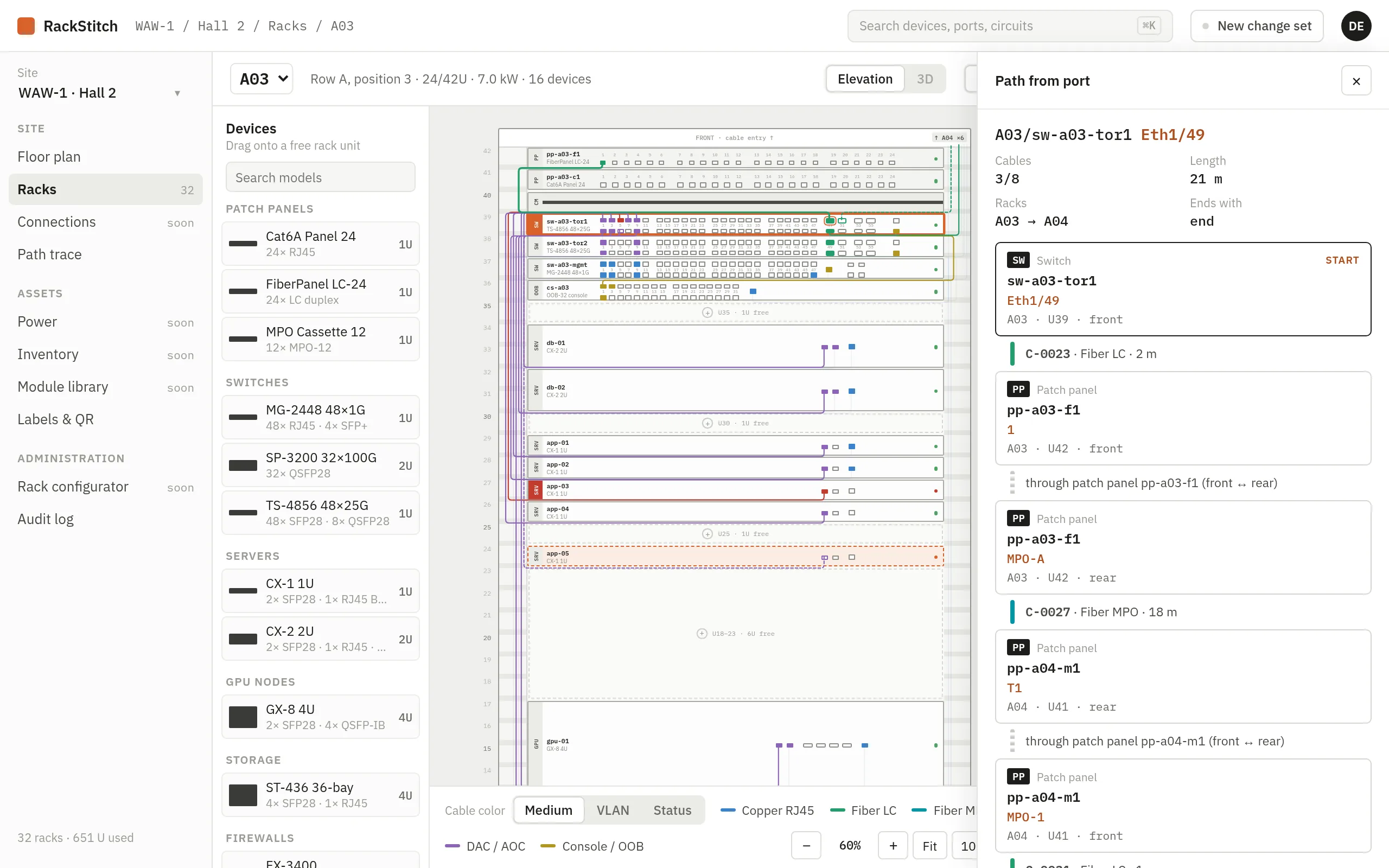
This is the question your records exist to answer. If tracing a port still requires a walk to the rack, the records are incomplete, either because a cable is missing or because a panel’s internal mapping was never defined.
Keeping records current after every change
Records go stale for one reason: the change happens in the room and the update happens later, or never. A few habits keep the gap closed:
- Plan first, then patch. Record the new or moved cables as planned before the work starts. The technician works from the plan instead of improvising, and the ports are reserved so nobody else uses them.
- Confirm after the work. When the patching is done, the planned changes become active in one step. Changes that did not happen are discarded, not left half-recorded.
- Keep a history. Who changed which cable and when is often the fastest way to explain an outage.
- Label from the records. Print labels from the documented cable identifiers, not the other way round. A label that does not match a record is a sign that something was changed outside the process.
- Audit a rack at a time. A periodic walk with the records in hand, one rack per visit, finds the drift before it accumulates.
Moving off the spreadsheet
You do not need to document everything again from scratch. A workable migration looks like this:
- Define the device models you have, especially patch panels and their front-to-rear mapping.
- Import racks and devices with their rack unit positions.
- Import the existing cable list, mapping each end to a real port. Rows that do not map cleanly (unknown device, port out of range, duplicate port) are the errors that the spreadsheet was hiding. Fix them now.
- Walk the room rack by rack, verify each panel and print labels as you go. Correct the records on the spot.
- From that day, make every change through the planned-then-confirmed process above.
The first pass through a busy rack is slow. After that, keeping records current costs a few seconds per change, far less than one flashlight-and-trace session.
Where RackStitch fits
RackStitch, the documentation tool we build at Kynologic, uses the model described above. Device models in its library define the ports and the front-to-rear mapping of patch panels, the connections list records each cable with both ends, medium, VLAN, length and status, and path tracing follows cables through patch panels using that mapping. New and moved cables are recorded in a change set as planned and applied after review, with every change kept in the audit log. Read more on the cable management page or try it in the live demo.
Sources
- Telecommunications Industry Association, ANSI/TIA-606-D: Administration Standard for Telecommunications Infrastructure (summary by the TIA Fiber Optics Technology Consortium).
- Patrick McLaughlin, Cabling Installation & Maintenance, TIA-606-C standard requirements for cable-plant administration.
- Fluke Networks, Fiber Polarity Basics for Duplex Applications.
- Siemon, ANSI/TIA-568.3-E introduces new polarity methods.